
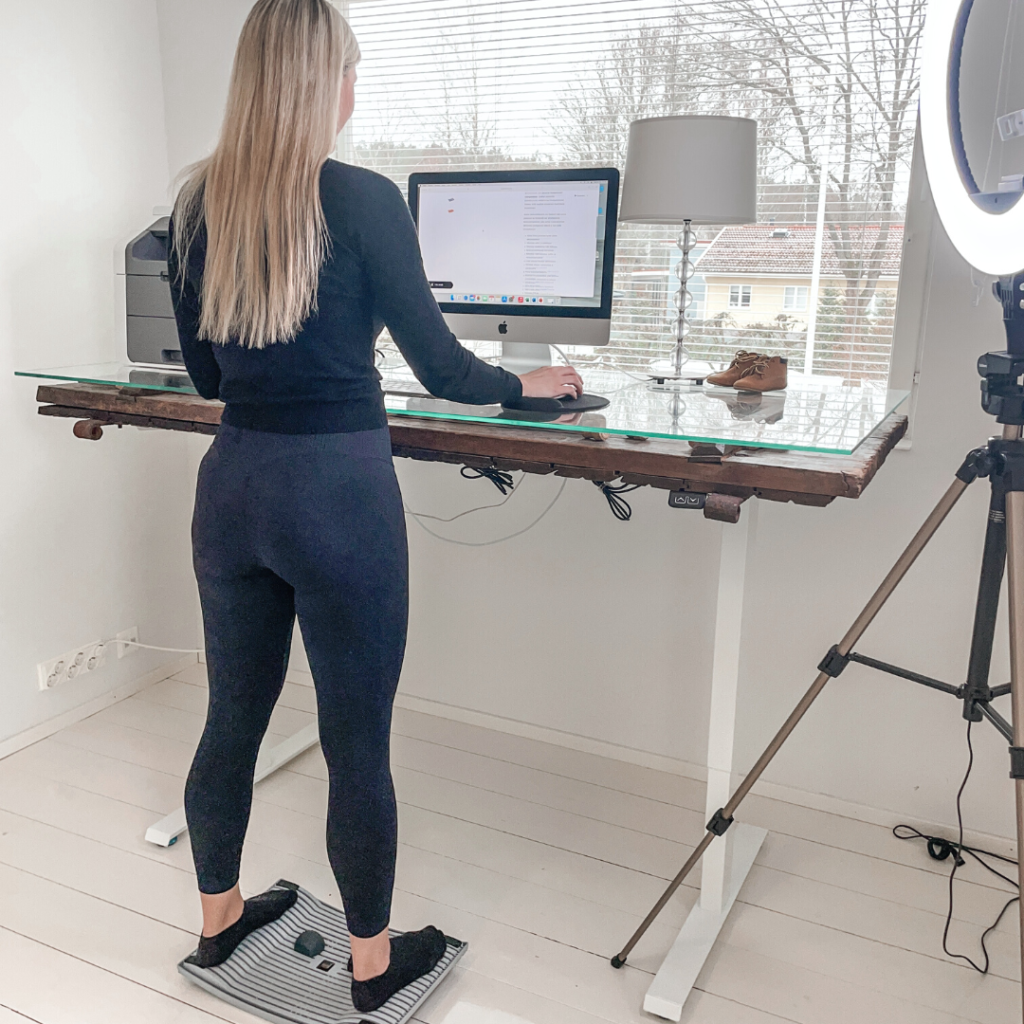
Remote work has changed how we work, but home office ergonomics can easily become an afterthought. An unsuitable desk, a poorly positioned laptop and long periods without movement can make working from home uncomfortable. Creating an active home office starts with practical adjustments that help you change position and move throughout the day.
You do not need a complete renovation or expensive equipment to get started. A well-arranged workstation, useful ergonomic accessories and regular breaks can make your workspace more comfortable and adaptable.
This guide covers the key elements of an ergonomic home office, products that encourage movement and common setup mistakes to avoid.
Why Movement Matters When Working from Home
Working at a desk often means spending long periods in the same position. At home, the absence of a commute, meeting-room walks and other natural interruptions can leave fewer opportunities to move.
An active home office makes movement easier to include in your routine. This can mean changing your sitting position, standing for suitable tasks, shifting your weight or walking during a break.
The aim is to vary how you work throughout the day. Standing can provide an alternative to sitting, but it should be part of a routine that also includes walking and other movement.
Key Elements of an Ergonomic Home Office
A comfortable workstation brings together suitable furniture, well-positioned equipment and an environment that supports your tasks. No single accessory can address every aspect of ergonomics.
An Adjustable Desk and Comfortable Screen Position
A height-adjustable desk makes it easier to alternate between sitting and standing. Adjust the working surface so your shoulders stay relaxed and your keyboard and mouse are within easy reach.
Check your screen position whenever you change desk height. The top of the screen should generally sit at or slightly below eye level, allowing you to read without repeatedly bending your neck or lifting your chin.
For laptop users, a Gymba® Läppäriteline can raise the screen to a more comfortable viewing height. Its lightweight, compact design makes it practical for home workspaces, including those that need to be packed away after use.
Use a separate keyboard and mouse for extended laptop work. This allows you to adjust the screen and typing position independently.
A Supportive Chair and Space to Move
An active home office still needs a comfortable sitting setup. Choose a chair that supports your back and allows you to work with relaxed shoulders.
Your feet should rest on the floor or a suitable footrest. Keep the space beneath your desk clear so you can reposition your legs and move closer to your work surface when needed.
Lighting That Limits Glare
Arrange your lighting so you can read your screen and documents comfortably. Daylight can be useful, but direct sunlight and reflections may make the screen difficult to see.
Adjust blinds, reposition your monitor or add a task light as needed. Check the setup at different times of day, especially if changing light causes you to lean forward or turn your head to see clearly.
A Manageable Sound Environment
Choose a workspace where background noise is manageable. If household sounds interrupt your concentration, consider headphones or a quieter location for demanding tasks.
Your home office should support both physical comfort and the practical requirements of your work.
Ergonomic Products That Encourage Movement
Choose ergonomic products according to how you work and where you need more flexibility. Accessories are most useful when they address a specific need and fit naturally into your routine.
An Activation Board for Standing Desk Use
Urheilupuolen tuotteemme Gymba® Activation Board introduces gentle, walking-like movement while you stand. Its patented cross-flexibility allows you to shift your weight and move your feet during suitable desk tasks.
The board also offers options for calf stretching and foot massage with the included massage balls.
Start with brief periods of use and adjust according to comfort. Alternate board use with sitting, standing on a stable surface and walking away from your desk.
A Foot Massage Tool for Breaks
A foot massage tool, such as the Gymba MassageBar, provides a way to include gentle foot massage in your breaks or after work.
Use light, comfortable pressure and follow the product instructions. Keep the tool nearby if it helps you remember to pause and change activities during the day.
A Stretching Stick for Upper-Body Mobility
Urheilupuolen tuotteemme Gymba Stretching Stick can be used for controlled upper-body mobility exercises during breaks.
Keeping it within reach makes it easier to include a short movement session between tasks. Follow the exercise guidance and stay within a comfortable range of motion rather than forcing a stretch.
How to Build an Active Home Office Step by Step
Make changes gradually so you can assess what works before adding more equipment.
- Review your current routine. Notice how long you stay in one position, which tasks keep you at your desk and where you feel uncomfortable.
- Adjust your existing workstation. Check chair support, screen height, keyboard position and the space available for your feet.
- Create an option for standing. If appropriate for your workspace, consider a height-adjustable desk or a stable desk converter. Check that both screen and keyboard positions remain comfortable.
- Introduce movement accessories gradually. Try an activation board for brief periods during suitable tasks. Increase use only if it remains comfortable.
- Plan regular breaks. Use task changes, calendar reminders or phone alerts as prompts to walk, stretch or change position.
- Keep useful tools accessible. Place mobility accessories where you can reach them easily without cluttering the workspace.
- Reassess the setup. Make further adjustments as your tasks, equipment or preferences change.
You can also add movement without buying anything. Walking during a phone call or getting up between focused tasks can help break up an otherwise static day.
Common Home Office Ergonomics Mistakes
Small setup problems can become easy to overlook when you use the same workstation every day. Review these common issues when assessing your home office.
Raising the Laptop Without Adding a Keyboard
A laptop stand can improve screen position, but typing on an elevated laptop may leave your arms and wrists at an uncomfortable angle.
Pair the stand with a separate keyboard and mouse so you can position each part of the workstation to suit your needs.
Replacing Prolonged Sitting with Prolonged Standing
A standing desk provides another working option, but spending hours standing still introduces a different form of static work.
Alternate positions and include walking breaks. An activation board can add movement during standing tasks, while time away from the desk adds further variety.
Trying to Hold a Perfect Posture All Day
Sitting rigidly upright can become tiring. A supportive workstation should allow you to relax, adjust your position and move comfortably.
Focus on making your equipment easy to reach and your screen easy to read. Change position rather than trying to remain still in one ideal pose.
Forgetting to Adjust the Desk Between Positions
A setup that works while sitting may need adjustment when you stand. Check desk height, screen position and keyboard placement each time you switch.
If your desk has memory settings, save comfortable sitting and standing heights as starting points.
Relying on Equipment Without Changing Habits
Ergonomic products are useful tools, but their value depends on how they fit into your working day. A standing desk that stays at one height or a mobility tool that remains in a cupboard offers limited opportunities for change.
Build simple habits around the equipment you use, such as standing for selected tasks or taking a short walk between meetings.
Make Movement Part of Your Home Office Routine
An active home office gives you options: comfortable sitting, suitable standing tasks, gentle movement and regular breaks away from the screen.
Start with the part of your setup that needs the most attention. Adjust it, assess how it works during normal tasks and make further changes as needed.