
Remote work has quietly transformed the way millions of people experience their bodies. What used to be an eight-hour stint at a purpose-built office desk has become an all-day stretch at kitchen tables, spare bedroom setups, and makeshift workstations that were never designed with the spine in mind. Getting home office ergonomics right is not just about comfort — it directly affects productivity, concentration, and long-term physical health. The good news is that meaningful improvements do not require a full renovation or a large budget.
This guide walks through the most important elements of an ergonomic home workspace, from recognising early warning signs to building sustainable movement habits into a remote workday. Whether working from home full-time or splitting time between the office and home, these principles apply equally.
Signs your home office setup is hurting you
Physical discomfort is the body’s way of communicating that something in the environment needs to change. The challenge is that many warning signs develop gradually, making them easy to dismiss as ordinary tiredness rather than setup-related problems.
The most common signals include persistent tension across the neck and upper shoulders, lower back stiffness that eases after standing up, wrist or forearm aches after typing sessions, and eye fatigue or headaches by mid-afternoon. Numbness or tingling in the hands can indicate that the wrists are being held at awkward angles for extended periods. If any of these symptoms appear regularly during or after the workday, the home office setup is likely contributing to them rather than supporting the body.
Posture-related fatigue is another telling sign. Feeling physically drained despite relatively light cognitive work often points to the body working harder than it should just to maintain a seated position. A setup that forces slouching, forward head posture, or asymmetrical weight distribution creates constant low-level muscular strain that compounds over hours and weeks.
The key elements of an ergonomic home workspace
A well-designed ergonomic workspace addresses the relationship between the body and every surface it interacts with — the chair, the desk, the screen, and the floor beneath the feet. Exploring a range of ergonomic home office products can help identify the right combination of solutions for any setup.
Chair and seated posture
The chair is often the first thing people focus on, and with good reason. A supportive chair should allow the feet to rest flat on the floor with the knees at roughly a 90-degree angle. The lumbar region of the lower back should be gently supported, not pushed forward aggressively. Armrests, when used, should allow the shoulders to remain relaxed rather than raised.
Screen height and distance
The top of the monitor or laptop screen should sit at or just below eye level, at a distance of roughly an arm’s length away. When the screen is too low — as it almost always is with a laptop placed directly on a desk — the head tilts forward, adding significant load to the cervical spine. A laptop stand that raises the screen to the correct height while allowing a separate keyboard and mouse to be used at desk level is one of the most impactful adjustments available for home workers. Our Gymba Laptop Stand offers two adjustable tilt angles and supports laptops up to 17 inches, making it a practical solution for both desk-based and mobile working.
Keyboard and mouse placement
The keyboard and mouse should be positioned so that the elbows stay close to the body and the forearms are roughly parallel to the floor. Reaching forward or upward to type places strain on the shoulders and wrists over time. A desk that is too high is a common cause of this problem in home setups.
How a sit-stand desk transforms all-day comfort
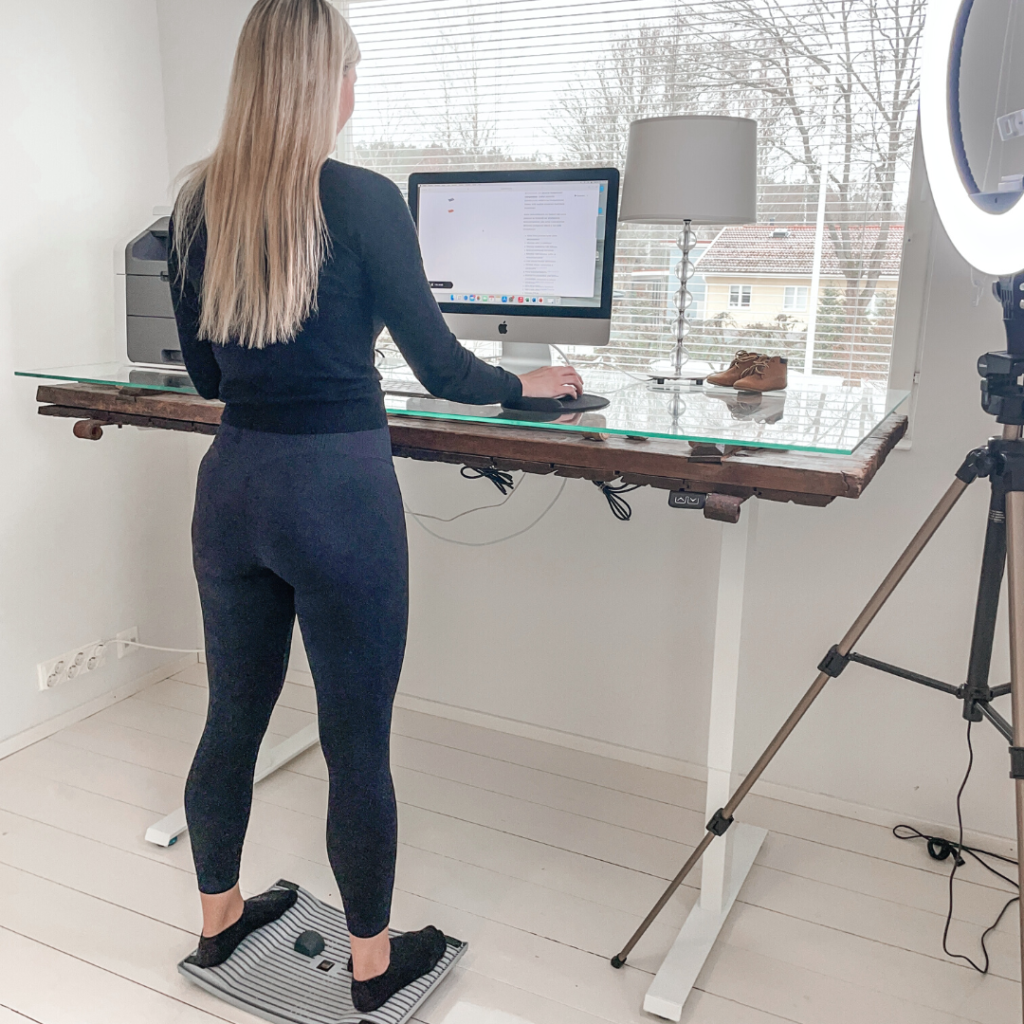
Alternating between sitting and standing throughout the day is one of the most evidence-supported strategies for reducing the physical toll of desk work. A height-adjustable desk makes this transition effortless, removing the friction that otherwise stops people from changing position regularly.
The benefit is not simply that standing burns more calories than sitting. The real value lies in the variety of postures and the reduction in sustained static load on the spine, hips, and lower limbs. Spending even short intervals standing — 20 to 30 minutes per hour — can noticeably reduce lower back discomfort and afternoon energy slumps. The key is making the transitions easy enough that they actually happen, which is where a motorised or smoothly adjustable desk pays for itself quickly.
Standing at a desk also creates an opportunity to introduce gentle movement. Products designed for active standing, such as an activation board that allows subtle weight shifts and walking-like movements, extend the physical benefit further. The Gymba Activation Board is built specifically for this purpose — its patented cross-spring design allows natural movement patterns while standing, and it doubles as a foot massage tool and stretching aid, making it a compact but versatile addition to any ergonomic home setup.
Ergonomic accessories that make a measurable difference
Beyond the core furniture, a range of smaller accessories can meaningfully improve the physical experience of working from home. The right additions address specific problem areas without requiring significant changes to the existing workspace.
A document holder placed beside the screen at the same height reduces the repetitive neck rotation that comes from frequently looking down at papers or a second device. A wrist rest for the keyboard can help maintain a neutral wrist angle during intensive typing periods, though it works best when used during pauses rather than actively while typing. An anti-fatigue mat or active standing surface makes extended standing periods more comfortable by reducing the impact on the feet, knees, and lower back.
Foot support is another often-overlooked element. When a chair is set at the correct height for a desk that is slightly too high, the feet may not reach the floor comfortably. A footrest or a product that provides gentle foot engagement — such as a massage bar or activation board used as a footrest while seated — addresses this gap. The Gymba MassageBar, for example, can be used to roll the soles of the feet during seated work, improving circulation and reducing the tension that builds up from hours of static positioning.
Common home office ergonomics mistakes to avoid
Even well-intentioned home office setups frequently fall into the same traps. Knowing what to watch for makes it easier to correct problems before they become chronic.
Working from a sofa or bed is perhaps the most widespread mistake. These surfaces offer no meaningful postural support and encourage prolonged spinal flexion that places sustained stress on the discs and muscles of the lower back. The occasional short session is unlikely to cause lasting harm, but making it a daily habit reliably leads to discomfort over time.
Using a laptop on a flat desk without any screen elevation is nearly as problematic. The screen sits far below eye level, and the keyboard is too close to the body, resulting in a posture that is difficult to maintain without neck and shoulder strain. Separating the screen from the keyboard — with a stand, an external monitor, or both — is a straightforward fix with significant results.
Ignoring lighting is another common oversight. Glare on the screen from windows or overhead lights causes the eyes to work harder and often leads to leaning forward to see the screen more clearly, which compounds posture problems. Positioning the desk so that windows are to the side rather than directly in front of or behind it helps considerably. Finally, setting up a workspace and then never adjusting it is a mistake in itself. Bodies change, tasks change, and the optimal setup for one type of work may not suit another.
Building movement into your remote workday
The most ergonomic chair and the best-positioned screen cannot fully offset the effects of sitting still for hours at a time. Movement is not a supplement to good ergonomics — it is a core part of it.
Structured breaks are the simplest starting point. A short walk, a few minutes of stretching, or even standing up to make a drink every 45 to 60 minutes gives the body a reset that no static setup can replicate. Using a stretching tool like the Gymba Balance Board MINI during these breaks makes it easy to open the chest, mobilise the upper back, and counteract the forward-rounding posture that accumulates through a desk-based day.
Micro-movements during work are equally valuable. Small shifts in weight, gentle foot rolling, or subtle balance adjustments while standing at a desk keep the muscles engaged and the circulation moving without interrupting focus. This is the principle behind active standing products — the goal is not vigorous exercise but rather the kind of low-level, continuous movement that the human body is designed for.
Building these habits takes deliberate effort at first, but they quickly become automatic. Setting a simple reminder to change position, keeping a stretching tool within reach, or placing an activation board in front of the standing desk are all environmental cues that make movement the path of least resistance rather than an afterthought. Over time, a remote workday structured around regular position changes and intentional movement becomes not just more comfortable, but noticeably more energising.
Ready to improve your home office ergonomics?
If any part of this guide resonated — whether it is persistent back tension, an awkward laptop setup, or simply the desire to feel better at the end of a working day — the next step is straightforward. Gymba Ergonomics offers a focused range of products designed to address exactly these challenges, from the Gymba Laptop Stand and Activation Board to the Balance Board MINI and MassageBar. Browse the full range of ergonomic home office products to find the combination that fits your workspace and working style.