
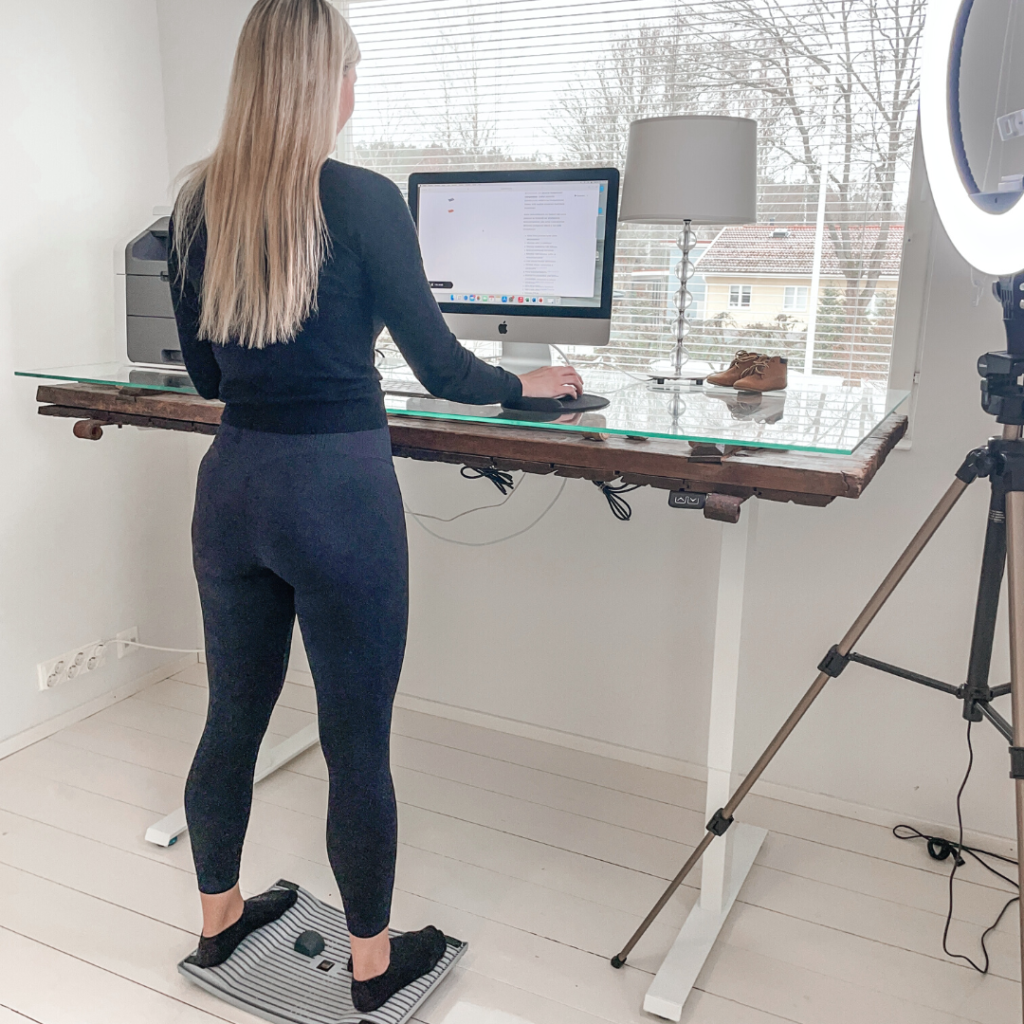
A standing desk and an ergonomic chair solve different aspects of back pain, and neither is a complete solution on its own. A standing desk reduces the compressive load on your spine by letting you alternate between sitting and standing, while an ergonomic chair improves your seated posture to minimise strain during the hours you do sit. For most people dealing with a desk job and chronic back discomfort, the most effective approach combines both tools rather than choosing one over the other. This article works through the key questions to help you decide what your workstation actually needs.
Which is better for back pain: standing or sitting?
Neither prolonged standing nor prolonged sitting is better for back pain, because the real problem is staying in any one position for too long. Movement is the most effective remedy. That said, alternating between sitting and standing throughout the day reduces the sustained spinal compression and muscle fatigue that cause lower back pain and neck pain in desk workers more than sitting alone does.
Sitting for extended periods increases disc pressure in the lumbar spine, tightens hip flexors, and encourages a slumped posture that loads the cervical vertebrae, contributing to both lower back pain and shoulder pain. Standing, by contrast, engages postural muscles and improves circulation, but standing without movement for hours creates its own problems, including swelling of the legs, fatigue in the feet, and strain in the lower back from a locked stance.
The evidence consistently points to postural variety as the goal. Shifting between positions, taking short movement breaks, and incorporating gentle motion while you work all matter more than the specific piece of furniture you choose. This is the foundation of good ergonomics, and it shapes how you should evaluate any product designed to address back pain at a desk job.
How does a standing desk reduce back pain?
A standing desk reduces back pain primarily by allowing you to change your working posture throughout the day, which relieves the sustained pressure that builds up in the lumbar discs and supporting muscles during prolonged sitting. When used correctly as a sit-stand desk rather than a permanent standing station, it distributes physical load across different muscle groups and reduces the cumulative strain that causes lower back pain and neck pain.
When you stand at a properly adjusted desk, your spine can maintain a more neutral alignment than it often does in a slouched seated position. Your hip flexors are no longer held in a shortened, contracted state, which reduces the anterior pelvic tilt that frequently contributes to lower back pain. Blood flow improves throughout the lower body, which also helps with the swelling of the legs that many people experience after long hours at a desk.
However, the benefits depend heavily on how you stand. A static standing posture without any movement still creates muscular tension and fatigue. This is where adding an active standing accessory makes a meaningful difference. Products like the Gymba® Board for active standing allow small, walking-like movements while standing at a height-adjustable desk, which keeps circulation active, reduces foot and leg fatigue, and encourages the micro-adjustments that prevent any single muscle group from becoming overloaded. The board also functions as a foot massage tool through its built-in massage balls, which helps relieve tension that builds in the soles during standing work.
What does an ergonomic chair actually fix?
An ergonomic chair improves the quality of your seated posture by providing adjustable support for the lumbar spine, hips, and arms, reducing the uneven loading that causes lower back pain, shoulder pain, and neck pain during seated work. It does not reduce the amount of time you spend sitting, but it makes the sitting you do significantly less damaging to your body.
A well-designed ergonomic chair addresses several specific problems at once. Lumbar support prevents the lower back from rounding into a flexed position that compresses the discs. Adjustable seat depth ensures your hips are properly positioned so your thighs are supported without cutting off circulation. Armrests at the correct height reduce the shoulder and neck tension that accumulates when your arms are unsupported for hours. Seat height adjustment allows your feet to rest flat, which distributes weight evenly and reduces swelling of the legs.
What an ergonomic chair cannot fix is the metabolic and circulatory slowdown that comes with sustained sitting regardless of posture. Sitting well is better than sitting badly, but sitting for eight hours in a perfect chair still reduces calorie expenditure, slows circulation, and creates prolonged spinal loading compared to a varied sit-stand routine. This is why ergonomics professionals consistently recommend pairing a quality chair with a height-adjustable desk rather than treating either as a standalone solution.
Can a standing desk and ergonomic chair be used together?
Yes, a standing desk and an ergonomic chair work best when used together. A height-adjustable standing desk paired with a supportive ergonomic chair gives you the flexibility to alternate postures throughout the day, which is the most effective strategy for reducing lower back pain, neck pain, and shoulder pain caused by a desk job. Each tool addresses what the other cannot.
The practical approach is to follow a sit-stand rhythm, such as sitting for 45 to 60 minutes and then standing for 15 to 30 minutes, adjusting based on what your body signals. When seated, the ergonomic chair ensures your lumbar spine, hips, and arms are properly supported. When standing, the desk rises to elbow height so your shoulders stay relaxed and your screen remains at eye level to prevent neck strain.
Adding movement to the standing phase amplifies the benefits further. Using an active balance board mini while at the raised desk keeps small muscle groups engaged, supports circulation, and prevents the static fatigue that comes from standing still. The combination of a quality chair, a sit-stand desk, and an active standing accessory creates a genuinely dynamic workstation that addresses the root causes of musculoskeletal discomfort rather than just managing symptoms.
Who should prioritise a standing desk over an ergonomic chair?
You should prioritise a standing desk if you already have a reasonably supportive chair but spend most of your workday in a fixed seated position with little opportunity to move. People whose lower back pain worsens as the day progresses, those who experience swelling of the legs by the afternoon, or those working in a home office where movement breaks are easy to take tend to benefit most from adding a sit-stand desk first.
A standing desk is also the higher-priority investment if your work involves tasks that translate naturally to standing, such as reviewing documents, taking calls, or working through straightforward tasks that do not require deep concentration. People who already take regular seated breaks but still struggle with back pain may find the posture variety a standing desk provides more impactful than upgrading their chair.
On the other hand, if your current chair provides no lumbar support and you are experiencing acute lower back pain or shoulder pain concentrated in the seated position, improving your chair may deliver faster relief. The decision ultimately depends on which part of your workday is causing the most strain and where the biggest gap in your current setup exists.
What else can reduce back pain during a workday?
Beyond furniture, the most effective strategies for reducing back pain during a workday are regular movement breaks, targeted stretching, and improving the overall ergonomic setup of your screen and keyboard. No chair or desk eliminates discomfort if the surrounding habits and environment remain unchanged.
- Movement breaks: Standing up and walking for even two to three minutes every hour reduces cumulative spinal loading, supports circulation, and counteracts the metabolic slowdown associated with sustained sitting.
- Screen positioning: Your monitor should be at eye level and roughly an arm’s length away. A screen that is too low forces your neck into flexion, which is a leading cause of neck pain and upper shoulder pain in desk workers. A Gymba® Laptop Stand for screen height can correct this immediately without a large investment.
- Stretching during the day: Targeted mobility work for the chest, hip flexors, and thoracic spine counteracts the postural patterns that sitting reinforces. A stretching stick designed for upper body mobility makes it practical to do a few minutes of movement between tasks without leaving your workspace.
- Foot care: Swelling of the legs and foot tension accumulate quietly during long workdays. Rolling the soles of your feet on a massage tool, whether as part of a standing board or a dedicated foot roller, improves circulation and reduces the referred tension that can contribute to lower back discomfort.
- Keyboard and mouse placement: Both should sit at a height where your elbows are at roughly 90 degrees and your wrists are neutral. Reaching forward or upward to type creates sustained tension through the forearms, shoulders, and neck that compounds over a full workday.
Good ergonomics is not a single product purchase but a system of habits and tools working together. A standing desk and ergonomic chair are the foundation, but the movement patterns, posture awareness, and supplementary tools you build around them determine how much relief you actually experience from lower back pain, neck pain, and the other physical costs of a desk job. You can explore the full range of ergonomic workplace products online to find the right combination for your workstation.
Build an ergonomic workstation that works for your back
If this article has helped you identify where your current setup is falling short, the next step is straightforward: start with the change that addresses your biggest source of daily discomfort. Whether that means adding a sit-stand desk, upgrading your chair, or introducing an active standing accessory like the Gymba® Board, each improvement compounds the last. Browse the full range of ergonomic workplace products at Gymba’s online store to find the tools that fit your workstation, your work style, and your body.